CHALLENGE A
Understand
Describe the Challenge
Students often struggle to understand how the internet actually works because the process is invisible, abstract, and filled with technical jargon. Terms like “packets,” “routers,” and “servers” feel disconnected from everyday experience, leaving learners to memorize definitions without a clear mental model.
Context and Audience
- Typical Audience: High school and university students (ages 15–22) in introductory computer science or digital literacy classes.
- Extreme Audience: Curious younger learners who use the internet daily but don’t know how it functions, or adult learners wanting a simplified but accurate explanation.
- Learning Context: Students are familiar with using the internet (sending texts, browsing, video calls) but rarely think about the mechanics behind it. They need relatable, visual explanations that simplify the journey of a message from one computer to another.
POV Statement
High school and early university students need an engaging, visual way to understand how the internet works so that they can connect abstract networking terms with real-world examples and remember them for both academic and personal understanding.
Learning Objectives
- Describe how digital messages are transformed into packets for delivery across the internet.
- Identify the role of routers as sorting centers that choose efficient paths for packets.
- Explain how data moves through physical infrastructure such as cables, fiber optics, and satellites.
- Recognize how network congestion, delays, and errors affect packet delivery.
- Understand how servers receive, reassemble, and present packets to recreate the original message.
- Connect the internet’s packet delivery system to the familiar metaphor of the postal service.
Plan
Ideate
I decided to create a comic on networks and the internet, a topic that wasn’t covered in much depth during my high school classes. I remember having to figure out how the internet really worked on my own, so I wanted to design something that would make the concepts more approachable for others.
Since most people are already familiar with how the postal system works, I chose to use that as a metaphor for the comic. The comparison between sending mail and transferring data online makes the abstract ideas of packets, routing, and protocols easier to grasp because the audience can connect them to something concrete and everyday.
The comic is around 20 panels long and walks the reader through the process of how information travels across the internet. For example:
- Letters and packages represent data packets
- Post offices act as routers that help direct mail to the correct destination
- Addresses on envelopes are like IP addresses, ensuring each message knows where to go
- Sorting centers stand in for servers and hubs, moving massive amounts of mail quickly
- Delays or lost letters parallel issues like latency and packet loss
By layering this familiar analogy with simple visuals and dialogue, the comic explains key concepts of networking and information transfer in a way that is engaging, accessible, and memorable.
Storyboard
| Image: Student looking curious at their laptop. Text (Narration): The internet is like a giant system that lets computers send information to each other, like digital mail. | Image: Split screen. Left: mail carrier delivering letters. Right: Cyber carrying packets. Text (Narration): Just like the postal service delivers letters, the internet delivers packets of information. | Image: Student typing a message. Dialogue (Student): I just sent a message to my friend, but how did it get there? | Image: The message transforms into Cyber, wearing a mailbag. Dialogue (Cyber): I’m your message, and I’ll deliver myself to your friend’s computer, like digital mail! |
| Image: Cyber beside laptop, holding envelopes labeled “packet.” Text (Cyber): First, I’m split into smaller pieces called packets. Each packet carries part of the message. | Image: Packets lined up like letters. Text: Together, we carry the whole message safely. | Image: Packets walking into a router designed like a post office. Text (Cyber): The router is like a sorting office. It decides where each packet should go. | Image: Router with signposts labeled “Server A,” “Server B.” Text (Router): I’ll send you on the fastest route! |
| Image: Packets traveling on cables drawn as highways. Text (Cyber): We move through wires, fiber optics, and sometimes satellites. | Image: A packet zooming through a glowing fiber optic cable. Text: Light signals carry us super fast, like express delivery! | Image: Packets stuck in traffic on a crowded highway cable, with a “Slow Connection” sign. Text (Cyber): But if the roads are jammed, we get stuck, that’s why the internet feels slow. | Image: A packet tripping, another going the wrong way. Text (Cyber): And sometimes packets arrive late, scrambled, or out of order. |
| Image: Cyber with a spare envelope, talking to a control tower. Text (Cyber): Don’t worry! The internet just asks for a resend until all packets are safely delivered. | Image: Packets arriving at a big server. Text (Cyber): Here’s the server. It gathers us all together again. | Image: Server reassembles packets like puzzle pieces. Text (Server): Message complete: ‘Hi!’ | Image: Recipient sees the message pop up on their computer. Text (Recipient): Cool, I just got your message! |
| Image: Student imagining packets as letters being delivered by mail carriers. Text (Student): So my message traveled across the internet like mail! | Image: Cyber saluting proudly with a mailbag. Text (Cyber): Exactly! Fast, reliable, and in the right order, even if the trip gets bumpy. | Image: Student frustrated as a video buffers (“Loading…”). Cyber stuck in traffic with other packets. Text (Cyber): That’s what’s happening when videos lag or downloads take forever, packets are delayed! | Image: Student smiling at laptop, Cyber waving goodbye. Text (Student): Now I really get how the internet works! Text (Cyber): Message delivered, mission complete! |
Principles Applied
In this project, I applied several of Mayer’s principles of multimedia learning to make the content engaging, accessible, and educationally effective.
Coherence Principle: I avoided unnecessary details and visuals, keeping the focus on the essential ideas such as packets, routers, cables, servers, and how messages travel across the internet.
Signaling Principle: Speech bubbles, arrows, and simple visual cues guide the reader’s attention to the most important actions, like packets moving through routers or being reassembled at the server.
Modality Principle: The comic uses a mix of visuals and dialogue instead of dense narration. Images show the flow of data while Cyber’s explanations provide clear verbal context, giving learners both visual and verbal channels to process information.
Redundancy Principle: Text and visuals complement one another rather than repeating the same content. For instance, panels show packets traveling, splitting, or getting delayed, while dialogue explains what those actions mean in terms of internet function.
Spatial Contiguity Principle: Dialogue and narration are placed directly next to the images they describe, helping readers immediately connect the words with the visual representation.
Segmenting Principle: The narrative is broken into 20 clear panels, each addressing a single step in the process, from sending a message, to packet transfer, to reassembly. This chunking helps learners follow the sequence without feeling overwhelmed.
Personalization Principle: The use of Cyber as a friendly guide creates a conversational tone, making the comic more approachable and relatable for students learning a technical subject.
Prototype
Panel 1
Image: Student typing a message on a laptop
Dialogue (student): “I just sent a message to my friend, but how did it get there?”
Panel 2
Image: The text message turns into a tiny character called “Cyber”
Dialogue (Cyber): “I’m your message and I will now travel to your friend’s computer”
Panel 3
Image: Cyber standing by a laptop.
Text (Cyber): “First, I’m broken into smaller pieces, called packets. Each one carries part of the message.”
Panel 4
Image: Multiple little “packets” lined up like a team.
Text: “Together, we make up the whole message.”
Panel 5
Image: Packets walk into a router shaped like a post office.
Text (Cyber): “This is the router. It decides where we go next.”
Panel 6
Image: Router with signposts labeled “Server A,” “Server B.”
Text (Router): “I’ll send you along the fastest path!”
Panel 7
Image: Packets traveling along cables like roads.
Text (Cyber): “We move through wires, fiber optics, and sometimes satellites.”
Panel 8
Image: A packet zipping through a glowing fiber optic cable.
Text: “Light signals carry us super fast!”
Panel 9
Image: Packets arrive at a server (big server tower).
Text (Cyber): “Here’s the destination server. It puts us back together.”
Panel 10
Image: Server reassembles all the packets into the full message.
Text (Server): “Message complete: ‘Hi!’”
Panel 11
Image: A person at another computer sees the message pop up.
Text (Recipient): “Oh cool, I just got your message!”
Panel 12
Image: Student looking amazed.
Text (Student): “So my little packets traveled across the internet like mail!”
Panel 13
Image: Cyber salutes.
Text (Cyber): “Exactly! Fast, reliable, and delivered in order.”
Panel 14
Image: Student thinking.
Text (Student): “But what if some packets get lost?”
Panel 15
Image: Cyber with a backup copy.
Text (Cyber): “No problem! The internet asks for a resend until all the pieces arrive.”
Panel 16
Image: Student smiling at laptop, Cyber waving goodbye.
Text (Student): “Now I understand how the internet works!”
Text (Cyber): “Glad I could deliver the message!”
Peer Feedback on Prototype
The positive feedback on my comic prototype highlighted the creativity and clarity of my approach. Reviewers appreciated that framing the concept of “how the internet works” through a postal system metaphor, with Cyber as a guide, made the topic more engaging and easier to understand. They felt the comic format effectively simplified a complex subject, and that my use of Mayer’s principles, especially coherence, signaling, and segmentation, helped keep the panels clear, organized, and easy to follow.
The constructive feedback offered helpful suggestions for improvement. One recommendation was to introduce more real-world context or stakes, such as illustrating the effects of slow internet or packet mix-ups, to make the story more relatable and entertaining. Another idea was to include a visual side-by-side comparison of the postal system and the internet to strengthen the metaphor. Implementing these changes would improve both the clarity and overall impact of the comic.
Final Comic
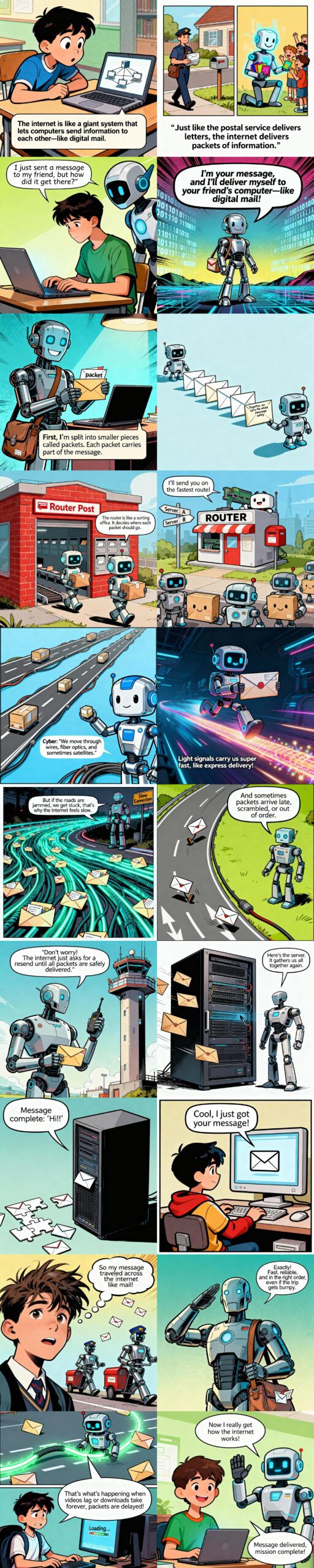
Model Used
I used Perplexity to generate the images since I had a pro account.
The prompt I used was: Illustrate a comic panel for the following scenario, Make sure the text is exactly the same as the prompt, and all the characters look the same as previous images for visual coherence (Cyber is a robot character in the comic and packets are shown as letters in envelopes). (followed by the panel description from the storyboard)
Biases
Eurocentric Character Design and Settings: Most human figures are portrayed with light skin, straight or slightly wavy dark hair, and dressed in Western-style clothing such as collared shirts, ties, and sweaters. The environments—like classrooms, suburban houses, and postal systems—mirror those typically found in North America and Western Europe, rather than drawing from global cultural contexts.
Western Postal References: The robots resemble mail carriers from the U.S. or U.K., wearing items such as blue uniforms, hats, and mailbags. Visual elements like envelopes and mailboxes follow Western conventions instead of reflecting diverse postal traditions.
Lack of Ethnic Diversity: Characters rarely show features, skin tones, hairstyles, or attire linked to non-European groups (e.g., Asian, African, Indigenous, or Middle Eastern). This lack of visibility reinforces the assumption that the “default” technology user is white and Western.
Conventional School Imagery: The classroom scenes highlight desks, chalkboards, and student clothing associated with middle-class Western schooling, without showcasing different learning environments, uniforms, or student populations from other parts of the world.
Reflection
Creating my comic on networks and the internet has been a valuable learning process for me. Since this was a topic that I struggled with in high school and had to learn independently, I wanted to design something that could make the concepts more approachable for others. Using the postal system as a metaphor gave me a familiar framework to explain abstract ideas like packets, routers, and servers. Adding the character Cyber as a guide helped bring personality to the explanation and kept the tone more engaging.
While developing the prototype, I intentionally applied Mayer’s multimedia learning principles. I eliminated unnecessary details to focus only on essential ideas (coherence) and used visual cues and speech bubbles to highlight the most important concepts (signaling). To balance text and visuals, I relied on images to illustrate processes like packet transfer while Cyber’s dialogue provided clear explanations (modality and redundancy). I also made sure to place text and visuals close together (spatial contiguity) and broke the story into small, digestible panels (segmenting). These design choices helped me translate a technical subject into a step-by-step journey that readers can follow without feeling overwhelmed.
The peer feedback confirmed that many of these choices were effective. Both reviewers appreciated the sequencing of the panels and the way the metaphor simplified abstract concepts. They also noted that Cyber made the comic feel accessible and friendly. At the same time, they suggested areas for improvement, such as adding more humor, including real-world stakes like slow internet or scrambled packets, and reinforcing the metaphor by showing a clearer side-by-side comparison between the postal system and the internet.
Reflecting on this, I see that while my comic successfully explains the core mechanics of information transfer, it could be made more memorable and relatable by weaving in humor and scenarios students encounter in their daily lives. This feedback has encouraged me to think about not just clarity but also engagement. For my final version, I plan to incorporate lighthearted jokes, relatable frustrations, and stronger metaphorical links so that readers not only understand the internet better but also enjoy the learning experience.
Citation
Perplexity AI. (2025). Comet Assistant [Large language model]. Perplexity. https://www.perplexity.ai